



Using Animal Enquiry
KEY TAKEAWAYS
- Search for animals using the four available search options.
- Click an animal's name to open its individual record.
- View detailed information through the EBVs, Pedigree, Progeny, Sales, and Media tabs.
Animal Enquiry is the primary area within BreedLOGIC Database Search for locating and viewing animal records. Searches are performed from within the Animal Enquiry section using one of the four available search methods: Quick Search, Basic Search, Advanced Search, or AI-Assisted Search. These search tools allow users to identify animals that match their search criteria and return a list of results. For more information on the available search options and how to use them, refer to the Finding Information: Search Options Explained user guide.
Once a list of animals matching the search criteria is displayed, users can view an individual animal's record by clicking on its name. This opens the animal's individual page, providing access to all information recorded against it, including identification details, pedigree, genetic evaluation results, progeny, sales history, and media.
ANIMAL INFORMATION
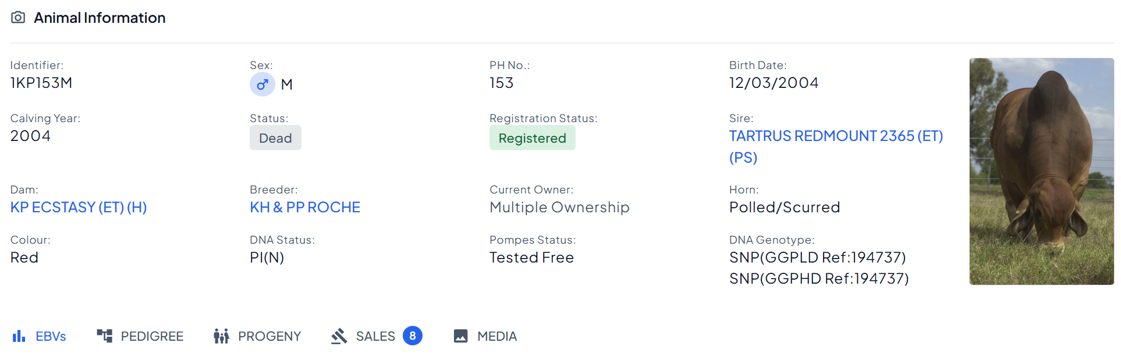
At the top of the animal's individual page, BreedLOGIC displays key identification and registration information for the animal (Figure 1). This typically includes details such as the animal's name, registration number or ident, sex, date of birth, registration status, breeder, current owner, and other core registration details. This summary section provides a quick overview of the animal before users move into the more detailed information available through the five tabs below.
- EBVs
The EBVs tab displays the animal's genetic evaluation results where a genetic evaluation program is available for the breed. Depending on the breed society, this tab may also be labelled EPDs, ABVs, or ASBVs. The information presented allows users to review the animal's estimated genetic merit across the traits and indexes published for that breed.
For some genetic evaluations, additional information is available to help users interpret and understand the published results, including explanatory information about the evaluation itself and descriptions of individual traits and selection indexes. Some evaluation systems also provide graphical tools to assist with interpretation. Together, these resources provide additional context around the published results and can help users better understand and apply genetic evaluation information.
- Pedigree
The Pedigree tab displays the selected animal and three generations of ancestors by default. The pedigree can be expanded to view additional generations where available.
This view is fully interactive. Users can hover over any animal within the pedigree to view a summary of its basic information, or click on an animal to open that animal's own Animal Enquiry page. This makes it easy to navigate through family lines and investigate related animals without returning to the search results.
- Progeny
The Progeny tab displays any recorded offspring for the selected animal. A search field is available to help locate specific progeny within the list, while Display Options can be used to include available genetic evaluation information alongside progeny records.
Users can choose to display 10, 25, or 50 progeny per page and use the navigation arrows to move between pages where an animal has a larger number of recorded offspring. This tab provides a convenient way to review an animal's breeding influence and explore its descendants.
- Sales
The Sales tab displays any sale information associated with the animal. This includes both active sale listings and previous sales in which the animal has been entered. Users can also view lot details and any lot notes recorded for the animal, providing a useful history of the animal's sale activity.
- Media
The Media tab displays any photos and videos recorded against the animal. Depending on the information available, users may be able to view animal photographs, sale images, videos, and other media files associated with the record.
SHARING LINKS TO ANIMAL RECORDS
Each animal's individual page has its own unique web address (URL). This means users can link directly to a specific animal record without requiring others to perform a search first.
This functionality can be particularly useful for breeders and vendors wishing to share additional information about an animal. Links to individual animal records can be included on stud websites, in online and printed sale catalogues, within email communications, and across social media platforms. By linking directly to the animal's BreedLOGIC record, users can provide immediate access to the most up-to-date pedigree, genetic evaluation, progeny, sales, and media information available for that animal.