


Using Member Enquiry
KEY TAKEAWAYS
- Search for members using the Member Enquiry search tools.
- Click a member's name or identifier to open their individual record.
- View member-specific information from a single page.
Members Enquiry is the primary area within BreedLOGIC Database Search for locating and viewing member records. Searches are performed using one of the four available search methods: Quick Search, Basic Search, Advanced Search, or AI-Assisted Search. These search tools allow users to identify members that match their search criteria and return a list of results. For more information on the available search options and how to use them, refer to the Finding Information: Search Options Explained user guide.
The Members Enquiry section is designed to display the current, financial members of the organisation. Once a list of members matching the search criteria is displayed, users can view an individual member's record by clicking on the member's name or identifier. This opens the member's individual page, providing access to all information recorded against that membership.
MEMBER INFORMATION
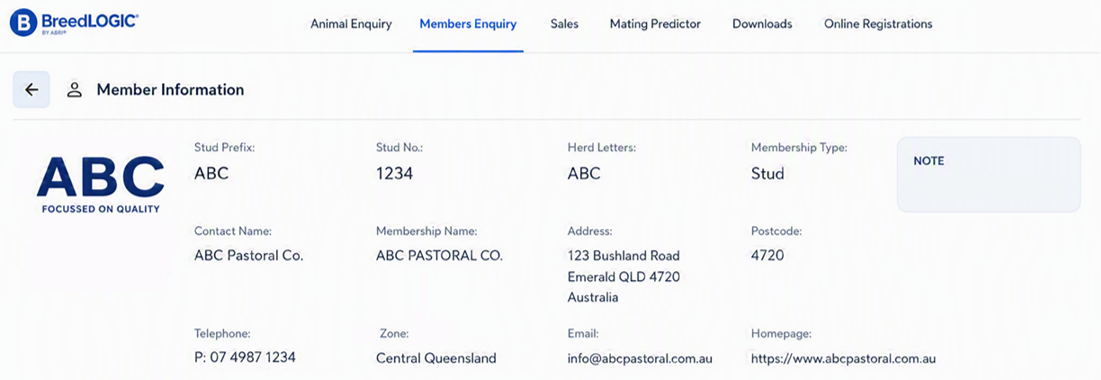
he individual member page displays key information about the selected membership (Figure 1). Depending on the organisation and the information recorded, this may include the member's stud prefix, identifier, herd letters, membership type, logo, brand and/or contact details.
Some organisations may also display additional information relevant to their members. For example, organisations participating in a genetic evaluation program may make member-level evaluation information available, such as participation status.
Because BreedLOGIC Database Search supports a wide range of organisations around the world, the information available within Members Enquiry can vary considerably. The information displayed may differ according to the organisation's requirements, member services, privacy settings, and applicable regional laws and regulations.